How to Know Who Your Partner Is Talking to on WhatsApp
Want to know who your partner is talking to on WhatsApp? Learn what you can actually see, how Linked Devices work, and how authorized WhatsApp monitoring works.
If you want to know who your partner is talking to on WhatsApp, the important distinction is between noticing changes in WhatsApp activity and actually seeing conversations.
WhatsApp does not provide a public tool that lets you enter someone's phone number and reveal their private chats. To review actual WhatsApp conversations, you need legitimate access to the account or an authorized connection established through WhatsApp.
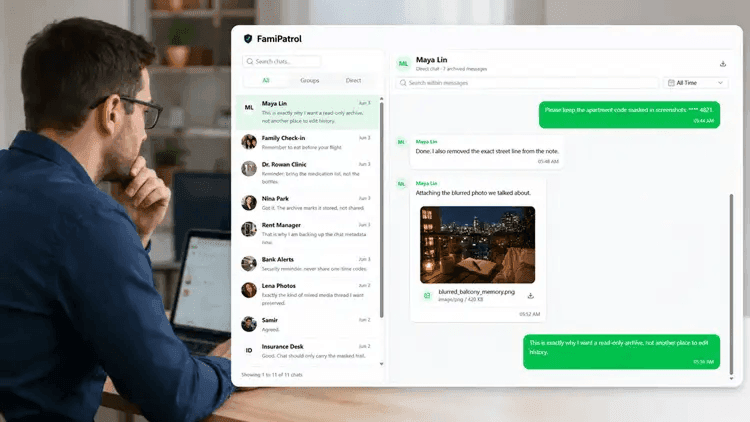
If the account owner agrees to the review, WhatsApp's Linked Devices system can connect the account to another authorized device or compatible dashboard.
This guide explains what you can realistically see, what common WhatsApp activity signals mean, how Linked Devices work, and how an authorized monitoring dashboard such as FamiPatrol can organize supported WhatsApp activity.
Can You See Who Someone Is Talking to on WhatsApp?
Yes, if you legitimately control the WhatsApp account or the account owner has authorized access.
A phone number alone is not enough to reveal someone’s private conversations.
WhatsApp uses end-to-end encryption for personal messages and calls. Private message content is designed to be available to the devices participating in the conversation rather than to arbitrary outside services.
In practice, reviewing real WhatsApp account activity normally requires one of the following:
- Access to your own WhatsApp account
- Permission from the account owner
- An authorized WhatsApp Linked Devices connection
- An authorized monitoring dashboard connected through WhatsApp
Any service claiming that it can reveal another person’s private WhatsApp chats using only a phone number should be treated with caution.
Signs Someone May Be Talking More on WhatsApp
People often search this question after noticing a change in someone’s phone habits.
Possible signs include:
- Using WhatsApp more frequently than before
- Checking notifications more often
- Turning notification previews off
- Spending more time on WhatsApp late at night
- Becoming more protective of the phone
- Taking the phone into another room more frequently
- Frequently switching back to WhatsApp after receiving notifications
These behaviors may indicate that someone’s usage pattern has changed.
They do not tell you who the person is talking to.
Phone behavior is a signal, not proof of a particular conversation.
What Can WhatsApp Linked Devices Show?
WhatsApp Linked Devices allows an account to work on additional authorized devices.
The account owner normally opens Linked Devices on the primary phone and authorizes the new connection.
After the device has been linked, supported account information can become available on that device, including:
- Individual chats
- Group conversations
- Messages
- Photos
- Videos
- Voice messages
- Documents
- Contacts
- Recent conversation activity
Linked Devices does not work as a public phone-number lookup service. The WhatsApp account must first authorize the connection.
A Phone Number Alone Cannot Reveal Private WhatsApp Chats
Be cautious of websites or apps claiming they can reveal private WhatsApp conversations simply by entering someone's phone number. Legitimate access requires control of the account or an authorized connection. A service that cannot clearly explain how account authorization works should not be treated as a private chat reader.
How to Check WhatsApp Linked Devices
If you are reviewing your own WhatsApp account, or an account you are authorized to manage, you can inspect its connected devices directly inside WhatsApp.
On Android
Open WhatsApp, select the menu, and open Linked devices.
On iPhone
Open WhatsApp, go to Settings, and select Linked Devices.
The Linked Devices screen shows devices currently connected to the account.
The account owner can also disconnect a linked device when access is no longer required.
This is fundamentally different from services that claim to secretly retrieve chats from an arbitrary WhatsApp number.
Can You Tell Who Someone Talks to Most on WhatsApp?
WhatsApp does not provide outsiders with a public ranking of who another person talks to most.
Information such as conversation history, frequent contacts, group activity, media, calls, and recent messages belongs to the WhatsApp account itself.
When an account is legitimately connected to an authorized review system, however, supported account activity can be organized into a dashboard that makes conversations and recent activity easier to review.
Do WhatsApp Tracker Apps Really Work?
The phrase “WhatsApp tracker” can describe several completely different types of products.
Some tools monitor publicly observable activity such as online-status patterns.
Others require software to be installed directly on a phone.
Some use WhatsApp’s own device-linking mechanism to display account information through another interface.
Before using a WhatsApp monitoring service, ask four questions.
Does It Require Account Authorization?
A legitimate connection should clearly explain how the WhatsApp account is connected.
Be cautious of products claiming they can access arbitrary private chats with no account authorization.
Does It Explain What Data It Can Show?
Look for specific capabilities rather than vague promises.
A monitoring service should clearly state whether it supports information such as:
- Chats
- Photos
- Videos
- Voice messages
- Documents
- Contacts
- Groups
- Calls
- Recent activity
Does It Require an Additional Monitoring App?
Traditional parental-control applications often require software to be installed on the monitored device.
A WhatsApp-focused system can use an authorized account connection and provide the review interface through a browser instead.
Is the Dashboard Read-Only?
Reviewing an account is different from controlling it.
A read-only dashboard should not require controls for sending messages, editing conversations, deleting messages, or changing WhatsApp account settings.
How Authorized WhatsApp Monitoring Works
- 1
Open the Connection Setup
Start the WhatsApp connection from the monitoring dashboard using an account you own or are authorized to review.
- 2
Authorize the WhatsApp Account
Use the authorized WhatsApp account to complete the QR-based connection process. The account must deliberately participate in setup.
- 3
Review Supported Activity
After supported data is available, use the browser dashboard to review chats, media, contacts, groups, calls, and recent account activity in a read-only interface.
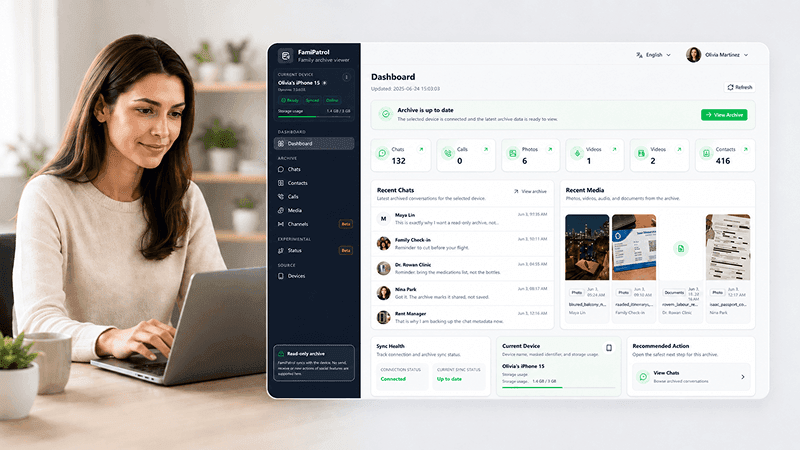
Review Authorized WhatsApp Activity with FamiPatrol
FamiPatrol is designed for authorized WhatsApp account review without requiring a broad phone-monitoring app. After QR-based authorization, supported WhatsApp data is organized in a private browser dashboard so you can review chats, media, voice messages, documents, contacts, groups, calls, and recent activity from one place. The dashboard is read-only. It is designed for reviewing supported account information rather than sending, editing, or deleting WhatsApp messages.
Frequently Asked Questions
Can I see who my partner is talking to on WhatsApp?
You can review WhatsApp conversations when you legitimately control the account or the account owner has authorized access. WhatsApp does not provide a public tool for looking up another person’s private conversations.
Can I see someone’s WhatsApp chats using only their phone number?
No. A phone number alone does not provide access to private WhatsApp conversations.
Be cautious of services that claim they can retrieve someone’s private messages simply by entering a phone number.
Can I monitor WhatsApp from another device?
WhatsApp supports additional authorized devices through Linked Devices. A compatible monitoring dashboard can also organize supported account information after the account has been properly authorized.
Do I need access to the WhatsApp account during setup?
Yes. An authorized account must participate in the connection process. A legitimate connection cannot be created simply by entering another person’s phone number.
Does FamiPatrol require an extra monitoring app on the connected phone?
FamiPatrol uses QR-based authorization and a browser-based dashboard rather than requiring an additional monitoring dashboard app on the reviewer’s device.
What WhatsApp information can FamiPatrol organize?
Depending on the supported account data available through the authorized connection, FamiPatrol is designed to organize chats, photos, videos, voice messages, documents, contacts, groups, calls, and recent activity.
Can FamiPatrol send or delete WhatsApp messages?
No. FamiPatrol is designed as a read-only review dashboard and does not provide controls for sending, editing, or deleting WhatsApp messages.
Can FamiPatrol connect to a WhatsApp account without authorization?
No. FamiPatrol is intended for accounts you own, manage, or have permission to review.
What to Remember
Changes in someone’s phone behavior cannot reliably tell you who they are talking to.
Actual WhatsApp account visibility requires legitimate account access or authorization.
If an authorized review is appropriate, QR-based account linking and a read-only dashboard can provide a much clearer picture of supported WhatsApp activity than trying to infer conversations from online status or phone habits.
FamiPatrol is an independent product and is not affiliated with or endorsed by WhatsApp or Meta.
Review Authorized WhatsApp Activity in One Place
Connect an authorized WhatsApp account and review supported chats, media, contacts, groups, calls, and recent activity from FamiPatrol's private read-only dashboard.